
AI has long stopped being limited to writing single functions or explaining error messages. Modern coding agents can inspect entire projects, edit files, run tests, execute shell commands, review pull requests, and work through complex multi-step development tasks.
Two names come up constantly in this space: Anthropic's Claude Code and OpenAI Codex.
But which coding agent is actually better?
The short answer: in 2026, OpenAI Codex is the stronger all-rounder for broad, parallel development workflows. Claude Code remains one of the most interesting alternatives, though — especially for developers who live in the terminal, work with large codebases, and want to configure their agents very precisely.
That said, the comparison isn't quite that simple. The real question isn't just "which AI writes better code?" but "which agent fits my workflow better?" That's exactly what we'll dig into here.
What exactly is an AI coding agent?
A classic AI chatbot waits for a question and gives an answer. A coding agent goes much further.
You could say something like: "Investigate this project, find the root cause of the login bug, implement the smallest possible fix, and then run all relevant tests."
A real coding agent can break that down into multiple steps on its own:
- inspect the repository
- find relevant files
- trace dependencies
- determine the root cause
- change the code
- run tests
- analyze failures
- refine the fix
- summarize the changes
This fundamentally changes the role of AI in programming. You stop asking for individual lines of code one at a time — you delegate a task instead.
What is Claude Code?
Claude Code is Anthropic's agentic coding tool for software development. It works directly in the terminal, among other places, and can read and edit files, run shell commands, search code, and connect to external tools. Anthropic also offers IDE and desktop integrations.
Typical tasks include:
- explaining existing code
- analyzing bugs
- implementing features
- refactoring
- writing and running tests
- reviewing git changes
- updating documentation
- searching large repositories
- using external tools
Claude Code also supports subagents, hooks, skills, and MCP. Individual subagents can be configured with their own prompts, tool permissions, and even different models — which makes Claude Code much more than just an AI chat running in your terminal.
What is OpenAI Codex?
OpenAI Codex is likewise an agentic system for software development. Codex can analyze local repositories, edit files, run shell commands and tests, and handle more extensive development tasks. The Codex CLI can be used interactively or via codex exec in repeatable scripts and CI pipelines.
Codex is now available across several surfaces: the terminal via Codex CLI, an IDE extension, the web, cloud environments, ChatGPT Desktop, automated workflows, code review, and an SDK for scripting.
OpenAI explicitly positions Codex for complex development work such as features, refactors, migrations, and code reviews. Multiple agents can work in parallel on different tasks or worktrees — that combination is one of Codex's biggest strengths. If you want to get started with the Codex CLI on Linux, KI-Buster has a full step-by-step guide. Install and Use Codex CLI on Linux (Read article)
Claude Code vs. OpenAI Codex, side by side
| Area | Claude Code | OpenAI Codex |
|---|---|---|
| Terminal | Very strong | Very strong |
| IDE integration | Very good | Very good |
| Repository analysis | Very strong | Very strong |
| Edit files | Yes | Yes |
| Shell commands | Yes | Yes |
| Run tests | Yes | Yes |
| Subagents | Yes | Yes |
| MCP | Yes | Yes |
| Skills | Yes | Yes |
| Hooks / workflow customization | Especially flexible | Very flexible |
| Parallel agents | Yes | Especially strong integration |
| Cloud workflows | Yes | Especially strong |
| Worktrees | possible, workflow-dependent | deeply integrated |
| Security approvals | Yes | Yes |
| OS sandboxing | Yes | Yes |
| Entry-level paid price | ~US$20 | ~US$20 |
| Limited free access | no | yes |
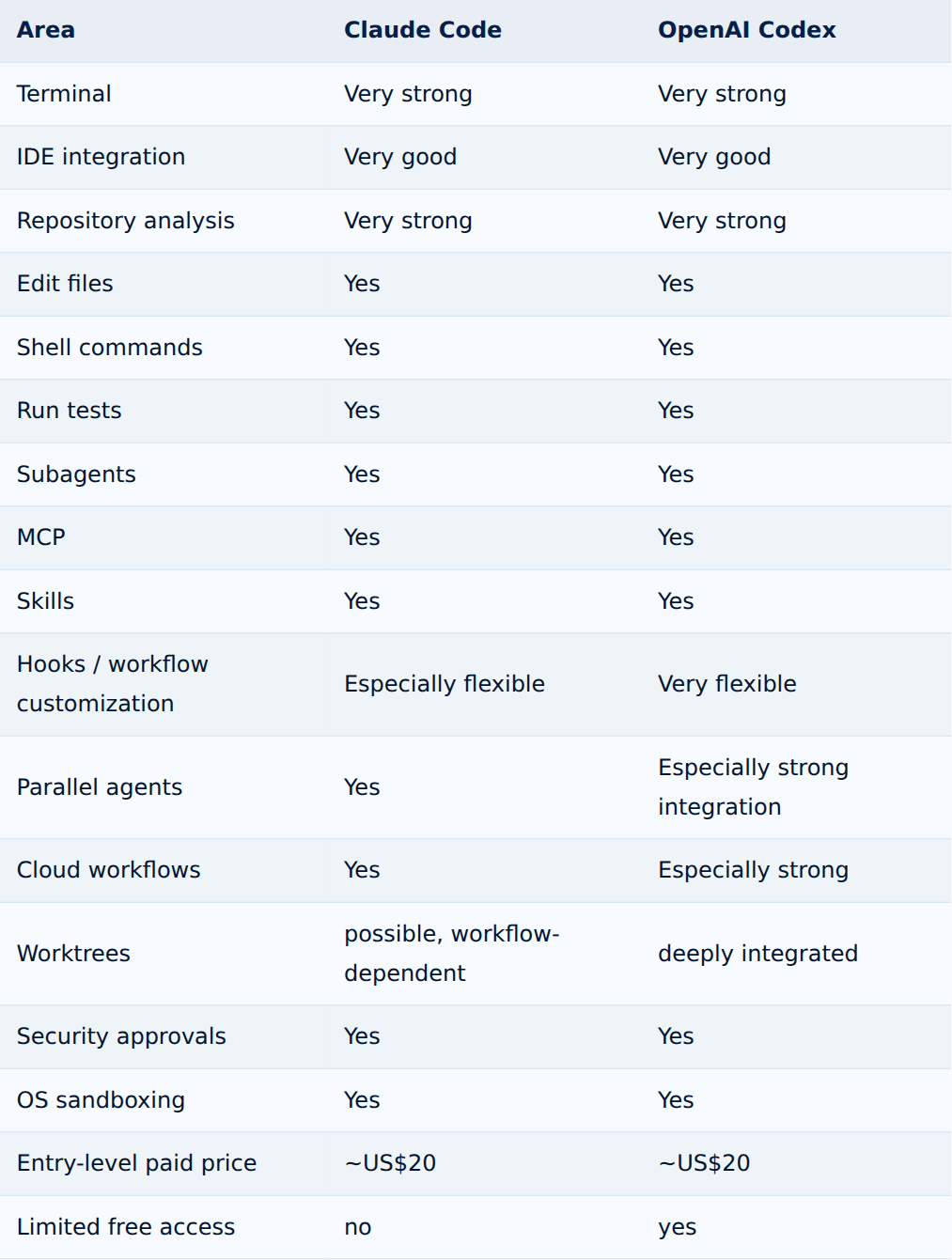
Tap the table to enlarge
Important: features and plan limits change regularly for both platforms. The figures here reflect the fact-check from August 20, 2026.
1. Installation and getting started
Getting started is fairly straightforward with both. Claude Code is launched inside a project and then works directly with the existing repository.
Codex offers a very similar approach with the Codex CLI:
cd my-project
codex
You can then describe a task in natural language, for example:
First, analyze the whole project.
Then look for possible causes of the error when
saving a user.
Don't make any changes yet.
Explain the most likely cause to me.
This approach matters: a coding agent shouldn't start making changes before it actually understands why a problem is happening.
Winner: tie. Both tools work excellently for terminal-based development.
Matching product in my shop · German-language edition
AI Assisted Coding – Vibe Coding Projektstart
A step-by-step guide to setting up a vibe-coding project with Claude Code the right way from day one — project structure, agent permissions, and secure credentials included.
2. Working with large codebases
This is where Claude Code gets particularly interesting. Claude Code supports large context windows on current models — Anthropic documents up to 1 million tokens of context for Claude Sonnet 5 under the right configuration. Claude Code also has automatic context compaction for longer sessions.
That can help a lot on large projects: extensive monorepos, microservice architectures, large legacy applications, dozens of configuration files, infrastructure repositories, and extensive documentation.
One caveat: a large context window doesn't automatically mean the AI should read every file at once. Good coding agents tend to work more efficiently when they first analyze the project structure and then open the relevant files deliberately.
Advantage: Claude Code. For extremely large context requirements, Claude Code has a real edge.
3. Working in parallel with multiple agents
This is where Codex shows one of its biggest strengths. OpenAI has built Codex heavily around multi-agent workflows — agents can work in parallel on different tasks, including in separate worktrees.
A developer could, for example, delegate several tasks at once: Agent 1 reviews authentication and looks for security issues, Agent 2 writes tests for the user controller, Agent 3 checks the API docs against the current code, Agent 4 investigates database queries for performance problems.
This changes software development in a meaningful way. Instead of guiding one AI assistant step by step, the developer increasingly becomes the coordinator of several specialized agents.
Claude Code also supports subagents and can spin up specialized agents for subtasks, configurable with their own prompts, tool permissions, hooks, skills, and sometimes different models. Still, Codex feels more purpose-built as a cohesive platform for parallel development work.
Winner: OpenAI Codex.
4. Customizability and building your own agents
Here Claude Code fights back. Claude Code has a very extensive extension system: skills, hooks, subagents, MCP servers, plugins, and permission rules. A Claude Code plugin can bundle skills, hooks, subagents, and MCP servers together.
Hooks are especially interesting — they let you trigger specific actions automatically, such as running a formatter after a code change, running tests automatically, blocking dangerous commands, sending notifications, enforcing project rules, or protecting certain files from changes. Anthropic explicitly describes hooks as a way to build deterministic rules into the agent's workflow, which is enormously useful for DevOps, platform engineering, and enterprise environments.
Codex also supports skills, subagents, MCP, configuration, and automated workflows. Skills can bundle instructions, resources, and scripts into reusable workflows.
Winner: Claude Code — narrowly. If you want to tailor your coding agent very precisely to individual terminal and automation workflows, Claude Code is particularly compelling.
5. MCP: both coding agents can connect to external systems
The Model Context Protocol, or MCP, is becoming increasingly important for coding agents. It lets an agent get controlled access to additional tools and information sources — documentation, databases, ticketing systems, APIs, monitoring, development tools, or internal company systems.
Claude Code supports MCP directly and can connect external tools and data sources through MCP servers. Codex supports MCP too — and can not only use MCP servers, but also run as an MCP server itself, plugging into larger multi-agent architectures. For a plain-language explanation of how MCP actually works, see MCP Explained: What Is the Model Context Protocol? (Read article)
Winner: tie. Both platforms are compelling for modern agentic infrastructure.
Matching product in my shop · German-language edition
MCP Server Praxisleitfaden 2026
A hands-on, German-language guide to the Model Context Protocol — covering MCP server security, least privilege, OAuth/OIDC, and GDPR questions that come up when connecting Claude Code or Codex to your own systems.
6. Security: which coding agent is safer?
This question matters more than any benchmark. A coding agent potentially has access to source code, configuration, the shell, git, the network, credentials, development servers, and databases — which makes it far more powerful than an ordinary chatbot.
Security in Claude Code: Claude Code has permission rules and sandboxing. Anthropic distinguishes between tool permissions and an OS-level sandbox for executed shell commands, and its documentation explicitly recommends a defense-in-depth approach.
Security in Codex: Codex likewise separates sandbox policy from approval policy. The sandbox defines technical limits for filesystem, network, and process access; the approval policy determines when the agent needs explicit sign-off. OpenAI also offers features like auto-review, where certain escalation requests can be checked by a separate reviewer agent.
Winner: tie. Both systems have capable security mechanisms. The bigger security risk usually isn't the product itself — it's poor configuration.
Never give a coding agent unnecessary full access. This combination is particularly dangerous: coding agent + root privileges + production server + internet access + credentials + no confirmation required. A single bad command can then cause serious damage.
Better: development environment → limited file permissions → sandbox → explicit network rules → tests → git diff → human review → deployment. A coding agent should be operated on the principle of least privilege wherever possible. A related risk arises when an agent interprets untrusted text from logs, files, or the internet as an instruction without review. Prompt Injection Explained: How Attackers Hijack AI Agents (Read article) The same least-privilege principle applies to the MCP servers both agents can connect to — for concrete hardening steps, see How to Operate MCP Servers Securely: Permissions, Tools, and Risks Explained (Read article).
Matching product in my shop · German-language edition
KI im Maschinenraum – common AI-in-ops pitfalls
A German-language guide to using Claude Code safely, scoping permissions sensibly, and reviewing AI-generated code before you rely on it.
7. Claude Sonnet 5 vs. GPT-5.6
The underlying model matters too, of course. Claude Code supports current Anthropic models such as Claude Sonnet 5 and Claude Opus 5, with Anthropic positioning Opus 5 for complex agentic coding and enterprise work in particular.
Codex now runs on the GPT-5.6 model family, which — depending on surface and plan — includes GPT-5.6 Sol, GPT-5.6 Terra, and GPT-5.6 Luna. OpenAI positions Sol as the model for especially hard, complex coding problems, Terra as a balanced everyday model, and Luna for fast, high-volume tasks. For hosted Codex code reviews and quality checks, OpenAI also uses GPT-5.6 Sol for eligible users.
Which one writes better code? There's no honest blanket answer. A benchmark can compare certain capabilities, but real software development involves far more: understanding the project, architecture, dependencies, tool calls, testing, debugging, context management, agent orchestration, and prompt quality. That's why coding agents are best evaluated on your own real projects, not just on isolated benchmark scores.
8. Pricing: Claude Code vs. Codex
The two systems are surprisingly close on price as well.
Claude Code: Claude Pro currently costs US$20 per month billed monthly, and Claude Code is included in the Pro plan. Claude Max starts at US$100 per month and offers higher usage limits. The free version of Claude does not currently include Claude Code.
OpenAI Codex: Codex is already available, in a limited form, on the free ChatGPT tier. ChatGPT Plus costs US$20 per month and includes Codex across the web, CLI, IDE extension, and cloud features. Codex Pro currently also starts at US$100 per month with higher usage limits.
Best value for beginners: Codex. The limited free tier lets you try Codex before paying anything. Under heavy use, actual costs on both platforms depend heavily on the plan, model, and scope of tasks involved.
9. Which coding agent works best on Linux?
Both. For Linux users, both Claude Code and Codex are particularly interesting because they integrate directly into terminal-based workflows.
System administrators and DevOps teams can put them to work on tasks like: analyzing bash scripts, optimizing Dockerfiles, checking Docker Compose files, reviewing Kubernetes YAML, auditing Terraform, editing Ansible playbooks, analyzing CI/CD pipelines, investigating logs, writing Python automation, and documenting configuration. The line between "coding agent" and "IT automation agent" keeps getting blurrier.
10. Which agent is better for beginners?
Codex has a slight edge here — not because Claude Code is complicated, but because OpenAI Codex is now integrated across multiple surfaces, so users don't have to work exclusively through the terminal. If you're already using ChatGPT, that's a relatively easy on-ramp. Claude Code, by contrast, tends to appeal most to people who already work regularly with the terminal, git, and development tools.
11. Which agent is better for professional developers?
This is where the decision gets harder.
Claude Code is a strong fit if you mostly work in the terminal, analyze very large projects, want to define extensive agent rules, want to use hooks heavily, want to build your own subagents, need highly individualized workflows, or want to use MCP extensively.
OpenAI Codex is a strong fit if you want to delegate multiple tasks in parallel, coordinate several agents, want to use worktrees, combine local and cloud workflows, want to use IDE, CLI, and desktop together, want automated code reviews, or already work heavily in ChatGPT.
12. Claude Code or Codex for DevOps?
For classic DevOps and sysadmin workflows, Claude Code is genuinely compelling. Hooks, granular permissions, subagents, and MCP combine very well — you could, for example, set up an agent that's only allowed to read Dockerfiles, read Kubernetes YAML, analyze logs, and run tests, while a separate agent is permitted to prepare actual changes.
Codex, though, also offers strong automation, security, and MCP features, and codex exec gives it a solid foundation for scripts and CI processes.
DevOps takeaway: Claude Code for maximally customized terminal workflows. Codex for more tightly integrated end-to-end agent workflows.
13. Can you use Claude Code and Codex together?
Yes — and it can genuinely make sense. You don't have to commit to a single vendor. One interesting workflow: Claude Code implements and prepares the change, Codex then performs an independent code review, followed by tests and a human review of the diff. Or the other way around.
For critical changes especially, having a second model act as an independent reviewer can be genuinely useful. But it's important to remember: two AI agents don't replace subject-matter judgment. If both models share the same wrong assumption, the bug survives. Running both together also has a technical side: Codex reads AGENTS.md by default, while Claude Code reads CLAUDE.md. For how to maintain shared project rules in just one place anyway, see AGENTS.md vs. CLAUDE.md: Which File Does Your Project Need? (Read article)
Claude Code vs. Codex: 2026 scorecard
| Category | Claude Code | OpenAI Codex |
|---|---|---|
| Getting started | 9/10 | 10/10 |
| Terminal | 10/10 | 10/10 |
| IDE | 9/10 | 10/10 |
| Large codebases | 10/10 | 9/10 |
| Customizability | 10/10 | 9/10 |
| Subagents | 10/10 | 10/10 |
| Parallel agents | 9/10 | 10/10 |
| Cloud workflow | 9/10 | 10/10 |
| MCP | 10/10 | 10/10 |
| Automation | 10/10 | 10/10 |
| Security controls | 10/10 | 10/10 |
| Beginner friendliness | 8/10 | 10/10 |
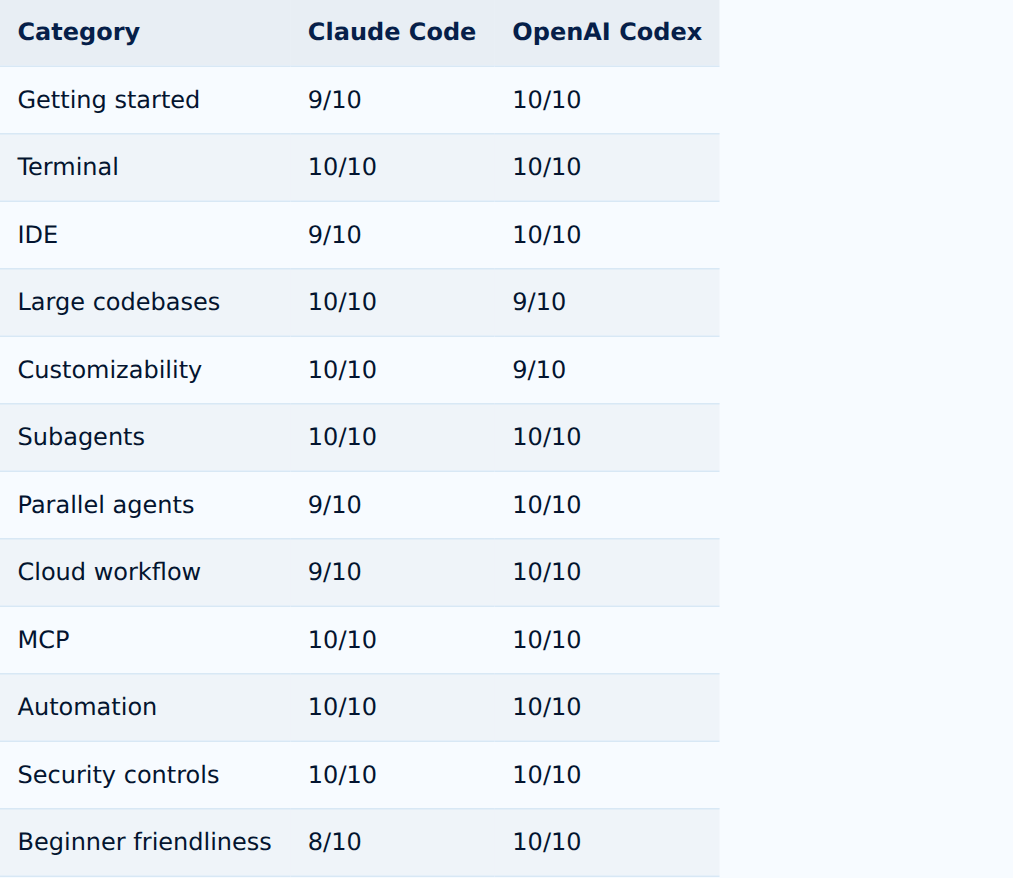
Tap the table to enlarge
This scorecard is a deliberately practical read on the available features and workflows — not a scientific benchmark of model quality.
Conclusion: Claude Code or OpenAI Codex — which coding agent is better?
As of August 20, 2026, OpenAI Codex is the broader all-rounder. That's not just about the underlying model — the real advantage is the complete package. Codex combines capable GPT-5.6 models with CLI, IDE, desktop, cloud, code review, worktrees, parallel agents, skills, subagents, MCP, automation, and sandboxing into a genuinely comprehensive development platform.
That doesn't make Claude Code the weaker option, though. For developers, administrators, and DevOps teams who work heavily in the terminal and want to tailor their agents with hooks, custom subagents, skills, and granular rules, Claude Code can actually be the better choice.
So the decision comes down to this: for a fully integrated coding-agent ecosystem, OpenAI Codex; for highly customizable, terminal-based agent workflows, Claude Code. And for professional developers? Test both. Because on real projects, what decides the outcome isn't the model's name — it's how reliably an agent understands your code, explains its changes, runs tests, and fits into your actual development process.
If you settle on Codex, you still have a choice between the desktop app, the CLI, and the IDE extension. For a breakdown of which of these three Codex interfaces fits which workflow, see Codex App vs. Codex CLI vs. IDE: Which One Fits Your Workflow? (Read article).
FAQ: Claude Code vs. OpenAI Codex
Is Claude Code better than Codex?
Not universally. Claude Code offers particularly strong options for terminal-based, highly customized agent workflows. Codex, on the other hand, has a very comprehensive ecosystem spanning CLI, IDE, desktop, cloud, and parallel agents.
Which coding agent is best in 2026?
For general-purpose use, OpenAI Codex currently has a slight edge. For highly individual CLI and DevOps workflows, Claude Code can be the better fit.
Can Claude Code work on entire projects?
Yes. Claude Code can analyze repositories, edit files, run commands and tests, and handle more complex tasks across multiple steps.
Can OpenAI Codex change code on its own?
Yes. Codex can inspect and modify local files and run tools and tests. Sandbox and approval settings control exactly which actions are allowed.
Does Claude Code support MCP?
Yes. Claude Code can connect to external tools, APIs, and data sources via the Model Context Protocol.
Does Codex support MCP?
Yes. Codex supports MCP and can even run as an MCP server itself, letting it plug into larger multi-agent architectures.
Can I use Claude Code and Codex together?
Yes. For example, one agent can implement code while the other serves as an independent reviewer afterward.
Are coding agents dangerous?
They can be, if they're granted unnecessarily broad permissions. Production access, secrets, root privileges, and unrestricted network access should only be granted when genuinely required and technically secured.
Sources and currency
Fact-checked as of August 20, 2026, against official documentation and announcements from Anthropic and OpenAI, including Anthropic on Claude Opus 5, OpenAI on GPT-5.6, Codex sandboxing, Codex agent approvals and security, and Codex subagents. AI coding agents evolve quickly, so features, models, pricing, and usage limits may change after publication.
How to Use OpenAI Codex Safely: Git, Sandbox, Backups, and Approvals (Read article)
Curious how Gemini stacks up against Claude Code and Codex for administrators? See the full three-way comparison: ChatGPT vs. Claude vs. Gemini for System Administrators (Read article)
Claude Code Subagents: Building Specialists for Complex Coding Tasks (Read article)