
The OpenAI Codex CLI brings a coding agent directly into the Linux terminal. Instead of copying code back and forth between a terminal and a chatbot, Codex works locally in the repository: analyze the project, edit files, diagnose errors, run tests, review Git changes.
This guide explains step by step how to install Codex CLI on Linux, authenticate, configure it safely, and use it day to day.
Quick answer
Install the OpenAI Codex CLI on Linux with the official installer: curl -fsSL https://chatgpt.com/codex/install.sh | sh. Then run codex login and sign in with your ChatGPT account – you do not need an OpenAI API key for interactive use. Codex is tested on Ubuntu and Debian among others; if you prefer a graphical interface, Codex has also shipped inside the ChatGPT desktop app for Linux since August 2026. This guide covers the CLI: login, AGENTS.md, sandbox permissions, MCP, /review, and codex exec for automation.
What is OpenAI Codex CLI?
Codex CLI is an AI coding agent for the terminal. Start it in a project and describe your goal in natural language. It can inspect source and structure, edit files, implement features, run shell commands and tests, inspect diffs, review code, and connect external tools through MCP. codex exec supports automation.
“Analyze this error, find the affected code, implement the smallest reasonable fix, and then run the existing tests.”
Install Codex CLI on Linux
OpenAI documents a standalone installer for Linux:
curl -fsSL https://chatgpt.com/codex/install.sh | sh
codex --version
codex --help
Run the installer again to update. Review downloaded installers before executing them, especially on managed systems. See the official Codex CLI documentation for the current command.
Sign in with ChatGPT or an API key
codex login
codex login status
codex logout
ChatGPT sign-in associates use with your account or workspace. Alternatively, pass an API key through standard input:
printenv OPENAI_API_KEY | codex login --with-api-keyNever commit API keys. API-key use is billed separately through the API.
Your first Codex session
cd ~/projects/my-web-app
codex
Analyze this project. Explain languages, frameworks,
structure, entry points, startup, and tests.
Do not change anything yet.Orientation is safer and more useful than starting with an open-ended request such as “fix everything.”
Ten structured AI prompts for Linux administrators (Read article)
Understand first, then change
Ask Codex to explain the cause, affected files, proposed solution, and possible side effects before implementation. For larger work, use the plan feature or /plan where supported by your current version.
AGENTS.md: persistent project rules
AGENTS.md contains instructions Codex reads before working. Use /init to create a starting point, then document architecture, restrictions, test commands, style, and completion criteria.
# Project rules

## Rules
- No new dependencies without justification.
- Never write credentials to files.
- Plan before large changes.

## Tests
- Backend: pytest
- Frontend: npm test

## Completion
1. Run tests.
2. Review the Git diff.
3. Explain the changes.
Personal instructions can live under ~/.codex/; repositories and subdirectories can contain more specific files. Instructions closer to the working directory can take precedence. See the official AGENTS.md guide. If you also work with Claude Code, it reads CLAUDE.md instead of AGENTS.md by default — for how to combine both files without maintaining rules twice, see AGENTS.md vs. CLAUDE.md: Which File Does Your Project Need? (Read article)
Configure permissions safely
Codex separates sandbox access from approvals. Common modes include read-only, workspace-write, and danger-full-access. Workspace access is sufficient for many tasks:
codex exec --sandbox workspace-write "Perform the defined task."Use /status to inspect the session and /permissions to manage rights. Apply least privilege.
Be careful with --yolo
--yolo aliases --dangerously-bypass-approvals-and-sandbox. It disables safeguards. Reserve it for externally isolated environments, never as the default on systems containing SSH keys, cloud credentials, .env files, or production access.
Review AI-generated commands and security risks (Read article)
Matching product · German-language edition
Linux Mint Without Frustration
A practical German Linux guide covering the terminal, system basics, and troubleshooting.
Essential slash commands
/status: inspect session configuration./model: choose an available model and supported reasoning settings./permissions: manage rights./diff: inspect current Git changes./review: review selected changes without automatically editing the tree./compact: summarize a long context./init: prepare AGENTS.md./mcp: show MCP connections./exitor/quit: end the session.
Commands can change by version; consult /help and the current slash-command reference.
Target files and run shell commands
Use @ to search for workspace files and include them in the prompt. Prefix a local command with an exclamation mark, such as !git status or !pytest. Sandbox and approval rules still apply.
Review code before committing
A robust flow is implementation → tests → /diff → /review → human review → commit. For bug fixes, explicitly request reproduction, root cause, a small fix, affected edge cases, tests, and a final inspection. To extend this local review discipline into a complete GitHub workflow with branches, pull requests, and @codex review, see How to Use Codex with GitHub: Branches, Pull Requests, and Code Reviews (Read article).
Use Codex for larger refactors
Define the goal, interfaces that must remain stable, prohibited dependencies, test stages, and measurable completion criteria. Plan first, implement in small steps, and test after meaningful changes.
Use current information with web search
codex --searchLive web search helps with framework versions, APIs, security advisories, and current documentation. Verify sources and prefer primary documentation.
Extend Codex CLI with MCP
codex mcp list
codex mcp add openaiDeveloperDocs --url https://developers.openai.com/mcp
MCP connects Codex to additional tools and sources under controlled permissions. OpenAI's public documentation server provides read-only developer documentation.
Model Context Protocol and MCP servers explained (Read article)
Matching product · German-language edition
MCP Server Practical Guide 2026
This German-language guide goes deeper into local and remote MCP servers, permissions, security, GDPR, and safe server automation.
Run Codex non-interactively
codex exec "Analyze the repository for obvious errors."
codex exec --sandbox workspace-write "Perform the defined task."
codex exec is designed for scripts and CI. Automation needs clear output requirements, restricted permissions, safe secrets, and reproducible tests. OpenAI also provides an official Codex GitHub Action.
Codex configuration on Linux
Persistent settings live in ~/.codex/config.toml. It can define the model, reasoning, sandbox, approval policy, profiles, and MCP. CLI flags can override settings for one run.
If you also want to control Codex on a remote Linux server from your smartphone over SSH, secure configuration and the full remote architecture are covered in the special feature Codex CLI & Codex Remote Control on Linux (Read article).
Free resource · German-language document
Codex CLI & Remote Control Handout (PDF)
Installation for 7 Linux distributions, secure configuration, and SSH remote setup in a free 23-page PDF (in German) to keep on hand.
A safe Linux workflow
- Open the repository and check
git status. - Create a deliberate Git checkpoint when appropriate.
- Start Codex and inspect AGENTS.md.
- Plan complex work first.
- Define a narrow, verifiable task.
- Inspect diff and review.
- Run tests.
- Commit only after human review.
Create and test shell scripts safely (Read article)
Matching product · German-language edition
Create Your Own AI Skills
German templates and checklists for documenting repeatable AI workflows.
What Codex should not do unchecked
Avoid broad instructions such as “delete every unnecessary file,” “clean up production,” or “fix everything and deploy.” Ask for analysis and a risk-assessed proposal first. Production systems require narrow permissions and human approval.
Ten useful Codex prompts
- Explain the repository without changes.
- Identify a bug's root cause.
- Implement a minimal fix without unrelated refactoring.
- Review changes for bugs and security issues.
- Add normal, edge, and failure-case tests.
- Rank performance bottlenecks by likely impact.
- Review validation, authentication, authorization, secrets, and injection risks.
- Update technical documentation from the implementation.
- Plan a behavior-preserving refactor.
- Critically inspect your own changes, tests, and diff.
Common mistakes
Starting in the wrong directory
Start Codex in the repository, not broadly in your home directory.
Oversized tasks
“Improve the application” is not verifiable. Limit component, outcome, and allowed changes.
No Git checkpoints
Inspect status and preserve a deliberate starting point.
Excessive permissions
workspace-write is often safer than unrestricted access.
Blind trust
Use Codex → tests → diff → review → human → commit.
Codex CLI vs. ChatGPT
| Capability | ChatGPT | Codex CLI |
|---|---|---|
| Answer questions | Yes | Yes |
| Local terminal | No | Yes |
| Repository analysis | Provided context | Directly local |
| Files and shell | Interface-dependent | With permissions |
| Git review | With context | Directly in repository |
| Automation | Different workflows | codex exec |
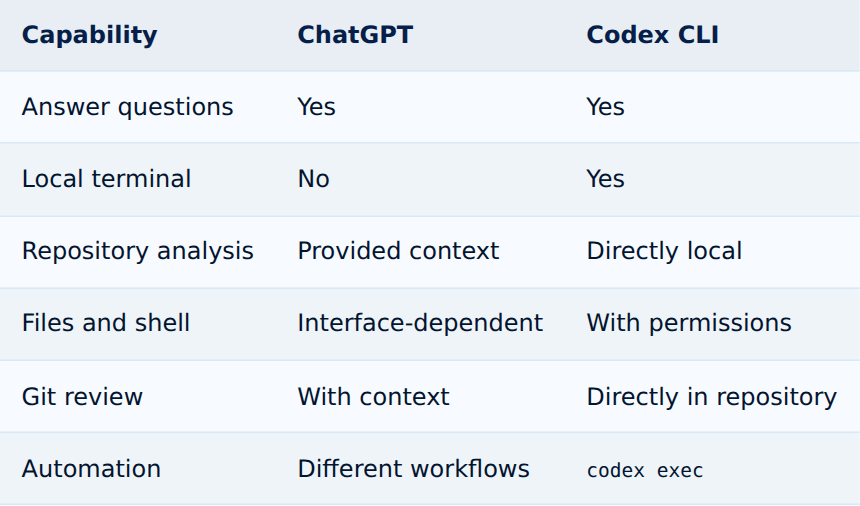
Tap the table to enlarge
FAQ: Codex CLI on Linux
Does Codex CLI run on Linux?
Yes. OpenAI provides an official installer.
How do I install Codex on Ubuntu or Debian?
curl -fsSL https://chatgpt.com/codex/install.sh | shDo I need an API key?
No. Interactive use supports ChatGPT sign-in; API-key use is billed through the API.
Can Codex edit files and run shell commands?
Yes, within configured sandbox and approval rules.
What is AGENTS.md?
A file containing persistent, hierarchical project instructions.
Can Codex review code?
Yes, including with /review.
Does Codex support MCP?
Yes. Manage connections with codex mcp.
Can Codex run in scripts?
Yes, with codex exec.
A terminal coding agent also helps with error analysis — for example when a Docker container won't start and Codex needs to check logs, the Compose file, and application code together. Debug Docker Errors with ChatGPT (Read article)
Conclusion
Codex CLI turns the Linux terminal into an AI workspace for repository analysis, debugging, implementation, testing, diff inspection, review, and automation. Its real strength comes from clear tasks, a useful AGENTS.md, least-privilege permissions, and consistent human control.
If you're also weighing whether Codex or Anthropic's Claude Code fits your workflow better, see the full comparison: Claude Code vs. OpenAI Codex: Which Coding Agent Is Better? (Read article) To see how the CLI stacks up against the Codex app and the IDE extension, see Codex App vs. Codex CLI vs. IDE: Which One Fits Your Workflow? (Read article)
- Start in the correct repository.
- Plan complex tasks first.
- Use AGENTS.md for persistent rules.
- Apply least privilege.
- Always inspect tests, diff, and review.
Codex CLI Linux cheat sheet
curl -fsSL https://chatgpt.com/codex/install.sh | sh
codex --version
codex login
codex login status
cd ~/projects/my-project
codex
codex mcp list
codex exec "Analyze this repository"
codex --search
codex logout
/init /plan /status /model /permissions
/diff /review /mcp /compact /exitInstall Ollama and run local LLMs as your own AI runtime (Read article)
Sources and currency
Content current as of August 9, 2026 and checked against official OpenAI documentation on August 12, 2026. Sources: Codex CLI, CLI reference, authentication, security and permissions, AGENTS.md, MCP, and non-interactive mode.
How to Use OpenAI Codex Safely: Git, Sandbox, Backups, and Approvals (Read article)
How to Use Codex with GitHub: Branches, Pull Requests, and Code Reviews (Read article)
How does Codex hold up against Claude and Gemini in day-to-day sysadmin work? See ChatGPT vs. Claude vs. Gemini for System Administrators (Read article)